WhatsApp template guidelines are the rules Meta applies to every message a business sends first. They exist to keep WhatsApp a channel people want to read, and they shape everything a sales team does on it: the first message to a form lead, the meeting reminder, the follow-up of a quote.
Most guides to WhatsApp templates explain the format and the approval process. This one also covers what decides whether your templates keep being delivered once they are approved: categories that Meta can change, quality ratings, per-user marketing limits and the rules in force since October 1, 2026.
What is a WhatsApp template and when do you need one?
A WhatsApp template is a message you write once, submit to Meta and reuse with variables, for example “Hi [First name], your visit is confirmed for [date]”. It can include a header, a body, a footer and buttons, such as quick replies or a link.
You need a template whenever the customer service window is closed. That 24-hour window opens each time a person sends you a message and resets each time they write again. Inside it, your team or your AI agent can reply freely; outside it, only an approved template goes through.
Concretely, a lead who fills in a form on your website has never written to you, so your first WhatsApp message to them must be a template. A lead who replied yesterday evening can still receive a free-form message this morning, as long as 24 hours have not passed.
No open window, no free-form message: outside 24 hours, WhatsApp only delivers approved templates.
Which WhatsApp template category should you choose?
The category describes what the message does, not what you would like it to cost. Meta defines three, and each one carries its own rules and price.
WhatsApp template categories
| Category | What it is for | Sales examples | Rules to know |
|---|---|---|---|
| Marketing | Promotions, invitations, re-engagement | Reconnecting with a lead, following up a quote, a new offer | The default for anything mixed or unclear; per-user limits apply |
| Utility | Updates specific to something the person asked for or bought | Meeting confirmation, visit reminder, missing document | Must be non-promotional; Meta can move it to marketing |
| Authentication | One-time passcodes | Login or account verification code | Fixed format with a code button; no links, media or emojis |
The trap of a follow-up disguised as utility
A message like “Your quote is waiting, shall we book a call?” describes a past request but invites the lead to buy, so it is marketing. Since April 2025, Meta approves a utility template that should be marketing directly as marketing, and its automatic review can change the category of templates already in use, usually with one day’s notice.
Repeated misuse leads to escalating penalties, from a warning to sending limits and restrictions on your account. If you disagree with a new category, you can request a review within 60 days, as the categorization rules explain.
What the category changes on the bill
Since July 1, 2025, Meta bills each delivered template by category and by the recipient’s country. Since October 1, 2026, service messages, the free-form replies sent inside the 24-hour window, are billed beyond 1,000 free messages per month and per phone number. Our WhatsApp API pricing calculator estimates the total for your markets.
Why does Meta reject a WhatsApp template?
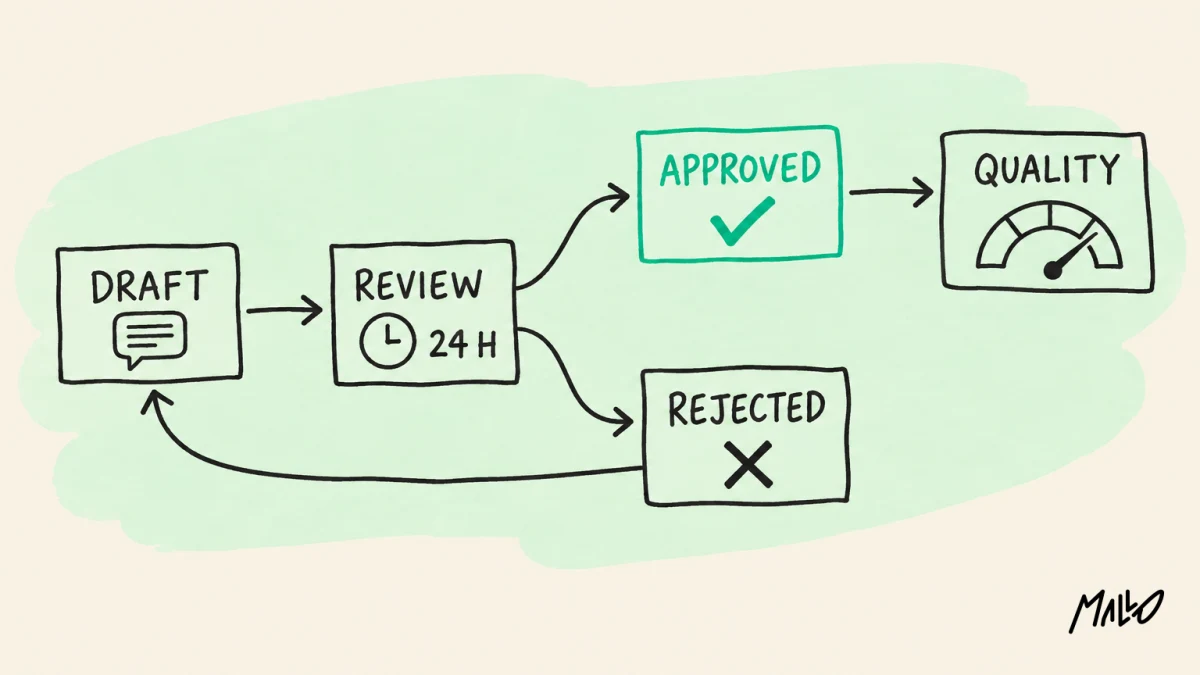
Meta reviews every template, usually within 24 hours, and rejections come down to a short list of reasons. Most of them are formatting mistakes rather than policy issues.
Variable mistakes
A template is rejected when it starts or ends with a variable, when the braces are broken, when variables are numbered out of order, or when there are too many variables for the length of the text. Every variable needs a sample value so the reviewer can read a realistic message.
Policy and content issues
Meta rejects templates that break its commerce or business policies, ask for sensitive identifiers such as a full card or ID number, or use threatening or abusive wording. A template that duplicates one you already have is also refused.
What to do after a rejection
Fix the reason given and resubmit, or appeal within the same tool if you think the decision is wrong; appeals are also reviewed within 24 hours. The template review page lists the current reasons.
What happens to your templates after approval?
Approval is only the first check. Once a template is live, Meta watches how people react to it, and that decides whether it keeps being delivered.
Quality rating and pausing
Each template has a quality rating based on how recipients respond, including blocks and reports. A template rated low is paused for 3 hours the first time, 6 hours the second time, and disabled the third time, according to Meta’s template pausing rules.
Per-user marketing limits
Meta caps how many marketing templates each person receives, based on how they engage with businesses. A lead who ignores everything stops receiving marketing templates, while marketing messages sent inside an open 24-hour window do not count toward the cap.
Opt-in
Before you send a template, the person must have agreed to receive messages from your business, with your business clearly named. Since November 2024, the opt-in does not have to mention WhatsApp by name, as the opt-in guidelines explain.
How do you write WhatsApp templates that pass and get replies?
A good template is approved quickly, stays in the right category and gets a reply. Five steps cover the essentials for a sales team.
Step 1: confirm the opt-in
Add a clear consent line to your forms and ads, naming your business. Without it, even a perfect template is a risk for your number.
Step 2: pick the category that describes the message
Ask what the message does for the person. If it confirms something they booked, it is utility; if it invites them back, it is marketing. Choosing honestly avoids recategorization and penalties.
Step 3: write short, personal and useful
Two or three lines, the first name, a reference to their request and one question. Avoid starting or ending on a variable, and give realistic sample values.
Step 4: set a cadence and a stop rule
Space your marketing templates out and stop after a clear closing message. Our WhatsApp follow-up message templates give a full cadence, from the first minute to a dormant lead.
Step 5: watch quality every week
Check each template’s quality rating in WhatsApp Manager. A template that turns yellow needs rewording before it is paused, not after.
How do you automate WhatsApp templates within the rules?
Templates handle the first message and the follow-ups; the real work starts when the lead replies. That is where most teams lose time, switching between templates, the inbox and the calendar.
Mallo is a French platform that deploys AI agents on WhatsApp to qualify, follow up and track your leads, from first contact to booked meeting. It runs on the official WhatsApp Business API, sends the right approved template at the right time, and switches to a natural conversation as soon as the lead answers.
Inside the open window, the agent asks your qualifying questions, books the meeting in your sales team’s calendar and sends the utility reminder the day before. Each lead is written to your CRM with a summary, and your reps step in for the meeting and the signature. See how the WhatsApp AI agent is set up for your industry.
Mallo comes with a free trial, then pricing depends on your lead volume and the steps the agent handles.