Knowing how to ask for a Google review on WhatsApp turns a satisfied customer into public proof for the next ones. The customer is happy, the job is done, and yet most of them never write a review simply because nobody asked at the right moment, in a channel they actually read.
Most guides either give templates without the rules or the rules without templates. This one puts everything in one place: the official way to get your review link, the right moment for each industry, 10 WhatsApp templates and what Google forbids.
Why ask for Google reviews on WhatsApp rather than by email?
A review request works when it is read while the customer still remembers the experience. WhatsApp messages are read within minutes, while a review email often waits among promotions until the moment has passed.
A channel Google itself mentions
Google’s help page on creating a review link or QR code presents messaging apps, including WhatsApp, as a way to send review requests. The link opens the review form directly on the customer’s phone, with no searching.
Short, personal and answered
A WhatsApp request reads like a message from the person who did the job, not a marketing email. Customers can also reply with a question or a concern, which tells you about a problem before it becomes a public review.
How do you get your Google review link?
Google gives every business a short link that opens the review form. It takes a minute to find, and you only need to do it once.
- Open your Business Profile in Google Search or Google Maps, signed in with the account that manages it.
- Click Read reviews, then Get more reviews.
- Copy the link, or generate a QR code from a computer browser for printed materials.
- Test the link on your phone before sending it to customers.
Keep the link in your message templates or in your CRM, so every request uses the same official link.
When is the right moment to ask for a Google review?
Ask right after the moment of satisfaction, while the customer is still talking about the result. The moment depends on what you sell.
The right moment, industry by industry
| Industry | Moment of satisfaction | When to send the request |
|---|---|---|
| Solar installer | System commissioned and producing | 1 to 3 days after commissioning |
| Renovation contractor | Work handed over, site clean | The day after handover |
| Real estate agency | Keys handed over | 2 to 5 days after the move |
| Coach or trainer | Program completed or goal reached | The day of the last session |
| Car dealership | Car delivered | 2 to 3 days after delivery |
| Insurance broker | Policy active, first question answered | After the first useful exchange |
Moments to avoid
Do not ask while a problem is open, right after an invoice, or weeks after the job when the customer has moved on. If something went wrong, fix it first; the request comes after, and goes to the customer like everyone else.
10 templates to ask for a Google review on WhatsApp
Replace the words in square brackets and add your review link. Outside the 24-hour window, a review request must be sent as a template approved by Meta; our WhatsApp template guidelines explain how.
Six templates by industry
Four templates for specific situations
What does Google forbid when you ask for a review?
Google’s rules are short and strict. Breaking them can lead to reviews being removed and restrictions on your profile.
Ask every customer, not only the happy ones
Review gating means sending the review link only to customers who said they were satisfied. Google forbids it: the request goes to every customer in the campaign, and an unhappy reply is handled by your team, who can fix the problem and answer publicly if a negative review is posted.
No reward, no dictated content
Do not offer a discount, a gift or an entry into a draw for a review, and do not tell customers what rating or words to use. Employees and relatives should not review your business either.
Reply to every review
Thank positive reviewers by name and answer negative reviews calmly, with the facts and an offer to talk. Future customers read the replies as much as the reviews.
How do you automate review requests without losing the human tone?
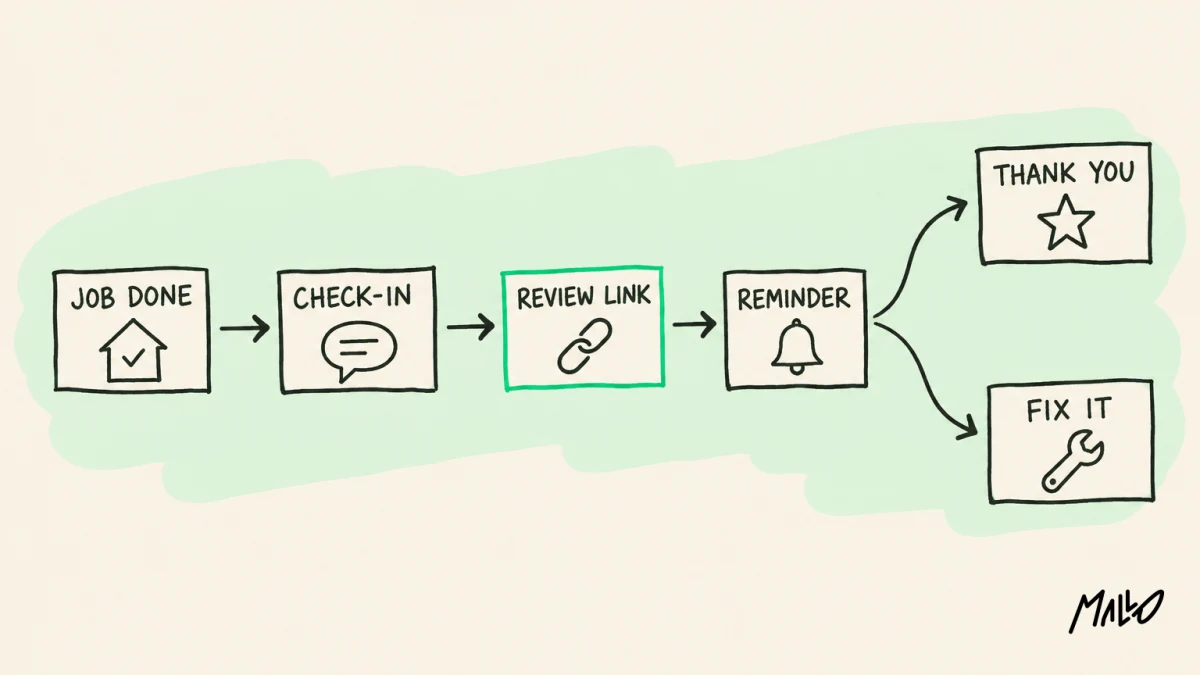
The request itself is easy to automate; the timing and the tone are what matter. A message triggered by the end of the job, written in the voice of the person who did it, keeps the request personal.
Mallo is a French platform that deploys AI agents on WhatsApp to qualify, follow up and track your leads, from first contact to booked meeting. After the sale, the agent checks in with the customer, sends the review request to every customer in the campaign at the right moment, reminds them once, and passes any negative feedback to your team so you can act on it. See how it works on our Google review requests page.
A few days after a positive review, the agent can also ask for a referral, the next step covered in our guide to referral automation. Mallo comes with a free trial, then pricing depends on your lead volume and the steps the agent handles.