
Knowing how to reactivate old leads is one of the fastest ways to fill a sales calendar without spending more on ads. Every business that has run campaigns for a year or two sits on a list of people who were interested, got one call that went to voicemail, and were never contacted again.
Most advice on reviving dead leads stops at “send an email with an offer”. This method goes further: segmenting by why each lead went quiet, checking that you are allowed to contact them, using messages people actually answer, and turning each reply into a qualified meeting.
What is a dormant lead, and why is your CRM full of them?
A dormant lead is a contact who raised their hand once and has gone quiet. Think of a notebook of potential jobs that nobody called back: each name was a real project at some point.
Dormant, cold or lost: the distinctions that matter
- Dormant: interested at some point, never really worked, no clear answer.
- Cold: contacted, then stopped replying after one or two exchanges.
- Lost: said no, signed elsewhere, or asked not to be contacted. Lost leads who opted out are never contacted again.
The four causes that create dormant leads
Leads go dormant because nobody replied fast enough, because the follow-up stopped after two unanswered calls, because the timing was wrong (“not before spring”), or because the lead was handed between salespeople and fell through the cracks. Each cause calls for a different message.
A dormant lead is a project nobody followed up, not a customer who said no.
Step 1: clean and segment the base before contacting anyone
Sending the same message to the whole base is the fastest way to waste it. Start with a clean list and three segmentation axes.
Clean: duplicates, invalid numbers, opt-outs
Merge duplicates, remove invalid numbers and emails, and exclude every contact who asked not to be contacted. Check what consent each lead gave and when: a lead without a valid basis for contact stays out of the campaign.
Segment on three axes
Segmentation matrix for old leads
| Segment | Typical profile | Priority | Reactivation angle |
|---|---|---|---|
| Recent and never reached | Under 3 months, calls unanswered | High | Apologize for the delay, offer a quick exchange by message |
| Timing issue | Said “later”, gave a period | High, at the date given | Check whether the project is back on the agenda |
| Went quiet after a quote | Received a price, no answer | Medium | New information: availability, updated price, incentive |
| Old and vague | Over 6 months, little information | Low | One simple question to sort live projects from dead ones |
Our lead reactivation ROI calculator estimates what each segment could bring back, based on your own numbers.
Step 2: choose the right reactivation channel
The best channel is the one the lead will read and can answer in seconds. For most old leads, that is a short message rather than a long email or an unexpected call.
Channels for reactivating old leads
| Channel | Strength | Limit | Best for |
|---|---|---|---|
| Room for detail, low cost | Low reply rate, filters | Leads who preferred email, newsletters | |
| Phone | Live conversation | Often unanswered, intrusive | Leads who replied and asked for a call |
| SMS | Read quickly | Short, little conversation | Simple yes or no questions |
| Read quickly, answered in a word, full conversation | Needs opt-in and an approved template | Restarting a conversation that can lead to a meeting |
On WhatsApp, reactivation always starts outside the 24-hour window, so the first message must be a template approved by Meta, usually in the marketing category. Meta also caps how many marketing templates each person receives and currently does not deliver marketing templates to US numbers; our WhatsApp template guidelines cover these rules.
Step 3: write reactivation messages that get replies
A reactivation message works when it reminds the lead who you are, gives a reason for writing now, asks one easy question and leaves an easy way out.
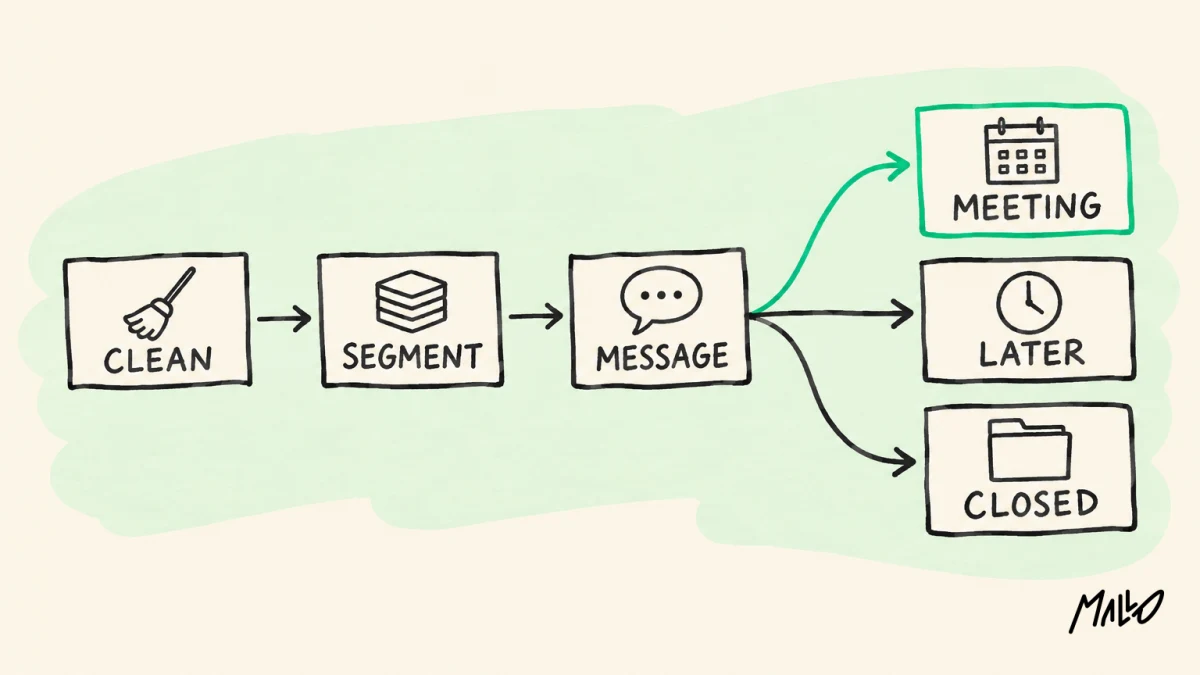
Keep the cadence short: one message, one reminder a week later, then stop. Leads who answer “not now” get a date in the CRM, not another message next week.
Step 4: turn replies into meetings
A reactivation campaign is judged on meetings, not replies. Every answer needs a next step within minutes.
Qualify in the conversation
Ask the questions that matter for a meeting: is the project still current, what has changed, when would they like to start, who decides. Keep it to three or four questions, one at a time.
Route each reply
- Project still on: book a meeting with a salesperson in the same conversation.
- Later: record the date given and schedule one message for that date.
- No longer relevant: close the lead with the reason, which tells you why leads were lost.
- Stop: remove the contact and record the opt-out.
How do you reactivate leads at scale without burning your list?
Reactivation fails when it becomes a blast: one message to everyone, no answers handled, no stop. Three rules keep it effective.
- Respect consent and the law: check what each lead agreed to and the rules where they live; our guide to WhatsApp marketing and GDPR covers the UK and EU.
- Send in waves: start with the best segment, read the replies, adjust the wording, then move to the next.
- Answer every reply fast: a lead who replies “yes” and waits two days goes dormant again.
Mallo is a French platform that deploys AI agents on WhatsApp to qualify, follow up and track your leads, from first contact to booked meeting. For reactivation, the agent sends approved templates segment by segment, answers every reply within a minute, qualifies and books meetings in your sales team’s calendar, and records dates and opt-outs in your CRM. See how database reactivation works with Mallo.
Mallo comes with a free trial, then pricing depends on your lead volume and the steps the agent handles.
Which KPIs should you track in a reactivation campaign?
Five numbers tell you whether the campaign works and which segment to prioritize next.
5 KPIs for a lead reactivation campaign
| KPI | How to calculate it | What it tells you |
|---|---|---|
| Delivery rate | Messages delivered divided by messages sent | The quality of your list |
| Reply rate | Replies divided by messages delivered | Whether the message and segment work |
| Meeting rate | Meetings booked divided by replies | Whether replies are handled fast and well |
| Show-up rate | Meetings held divided by meetings booked | The quality of qualification and reminders |
| Opt-out rate | Stop requests divided by messages delivered | Whether you are pushing too hard |
Compare segments, not campaigns: a segment with a low reply rate needs a different message, while a segment with replies but few meetings needs faster handling.